close-img
Industrial Axial Fan Blade Manufacturer | UTEK-DELE Technology Changzhou Co., LtdIndustrial Axial Fan Blade Manufacturer | UTEK-DELE Technology Changzhou Co., Ltd
mobile search button of img
search img of mobile head
    • Home
    • Fan Blades & Components
      mobile img of product plus
      • Fixed-Angle Fan Blades
      • Adjustable-Angle Fan Blades
      • Special & Integrated Fans
      • Air Cooling Systems
      • Equipment
    • Axial Fan
      mobile img of product plus
      • Axial Fan Replacement
    • Applications
      mobile img of cases plus
      • HVAC
      • Engine Cooling
      • Specialist Applications
    • News
      mobile img of news plus
      • Company News
      • Product News
    • Contact
    • Reversible Axial Fan
    • Small Axial Fan Impeller (300-600mm)
    • Medium Axial Fan Blade (500-1100mm)
    • Big Industrial Axial Fan (1000-2200mm)
    • Fixed-Angle Fan Blades
    • Adjustable-Angle Fan Blades
    Industrial Axial Fan Blade Manufacturer | UTEK-DELE Technology Changzhou Co., LtdIndustrial Axial Fan Blade Manufacturer | UTEK-DELE Technology Changzhou Co., Ltd
    admin@utekdele.com0086-13775063485
  • Home
  • Fan Blades & Components
    • Fixed-Angle Fan Blades
    • Adjustable-Angle Fan Blades
    • Special & Integrated Fans
    • Air Cooling Systems
    • Equipment
  • Axial Fan
  • Applications
  • News
  • Contact
  • Get A Quote Now

    • Reversible Axial Fan
      • Pneumatic Reversible Fan
      • Hydraulic Reversible Fan
    • Small Axial Fan Impeller (300-600mm)
      • H Series
      • PMAX Series
      • 4XR Series
    • Medium Axial Fan Blade (500-1100mm)
      • P Series
      • S Series
      • 7Z Series
      • K Series
      • R4Z Series
    • Big Industrial Axial Fan (1000-2200mm)
      • W Series
      • U Series
    • Fixed-Angle Fan Blades
    • Adjustable-Angle Fan Blades
    WHAT ARE YOU LOOKING FOR?
    *
    This field is required
    Total quantity you need
    *
    This field is required
    *
    This field is required
    Email format error
    Due to email instability, you might miss our correspondence. Please provide your phone number for alternative contact.
    This field is required
    Telephone information is wrong!
    Send Message
    Your location:Home  Axial Fan Identification Worksheet for Missing Labels
      • Axial Fan Identification Worksheet for Missing Labels

        • 1. Collect evidence from a named viewpoint

        • 2. Keep component identity separate from assembly identity

        • 3. Make the mounting and duty record useful

        • 4. Review the identification before releasing a purchase

        When a fan label is unreadable, start a replacement enquiry with the equipment identity, photographs from named views and the machine-side mounting information. Preserve any surviving codes exactly as found. Record what remains on the machine and what is to be replaced, then add the fan duty or the evidence needed to establish it. A clear evidence pack helps a supplier identify the assembly and request the particular missing data that matter.

        This worksheet supports an industrial axial fan blade or complete impeller enquiry, including an enquiry about a Multi-Wing assembly. UTEK-DELE supplies direct replacements for the corresponding mapped products. The original assembly and installed configuration still need to be identified so the ordered hub, blades and interface fit the actual equipment. Record uncertainties visibly while that identification is completed.

        1. Collect evidence from a named viewpoint

        Use the equipment's approved service procedure for safe access and inspection. Ask qualified personnel to obtain the required photos or measurements when guards, isolation or disassembly are involved. A normal exterior photo can provide layout context, while a drive-side drawing or service record may supply dimensions without opening the assembly. Record where each piece of evidence came from.

        Take a whole-assembly image to show the fan in relation to the shroud and drive. Add a label or marking image and an interface view when available. Name the side from which each photo was taken. “Clockwise” from the drive side reads oppositely from a view from the other side. Keep an airflow arrow separate from the rotation statement so an observer does not infer one from the other.

        Save the equipment model and serial or asset ID with each set. Several machines of the same make can have different cooling packs or a fan replaced during service. If the source is an earlier drawing, identify its revision and confirm that the retained equipment still matches. A motor label helps identify the drive. A moulded blade mark can identify a component. Neither automatically identifies the complete fan build.

        Evidence to collect before selecting a replacement
        RecordWhat to provideWhat it helps identify
        EquipmentModel, asset or serial number and installed locationWhich machine the enquiry concerns
        Whole assemblyInstalled view with drive and shroud visibleRelative position and supply scope
        Surviving marksClear image and exact transcriptionBlade, hub or original build reference
        ConnectionReleased drawing or authorised measurementMachine-side interface that must match
        DirectionRotation with a named view plus separate airflow arrowRequired handed configuration
        Operating dataSpeed, duty and available drive informationConfiguration and performance review

        2. Keep component identity separate from assembly identity

        A complete impeller combines a matched hub and blade configuration. A blade mould number may identify a profile, but several builds may use a related profile at different diameters, counts or pitches. A hub designation can help narrow a family without defining every shaft or flange connection. Keep each mark connected to the physical component on which it was found. If the code is partly legible, include the original photo and mark uncertain characters rather than choosing a likely number.

        The UTEK-DELE 6W product reference shows one complete assembly family and helps a buyer see the hub and blade relationship. The UTEK-DELE 5W product reference is a separate product reference, and Multi-Wing 7W to UTEK-DELE 9W2 guide explains the corresponding 9W2 replacement direction. These references are useful when comparing confirmed codes and drawings. Their photos cannot establish a hidden mounting dimension or identify an unknown unit from a similar outline.
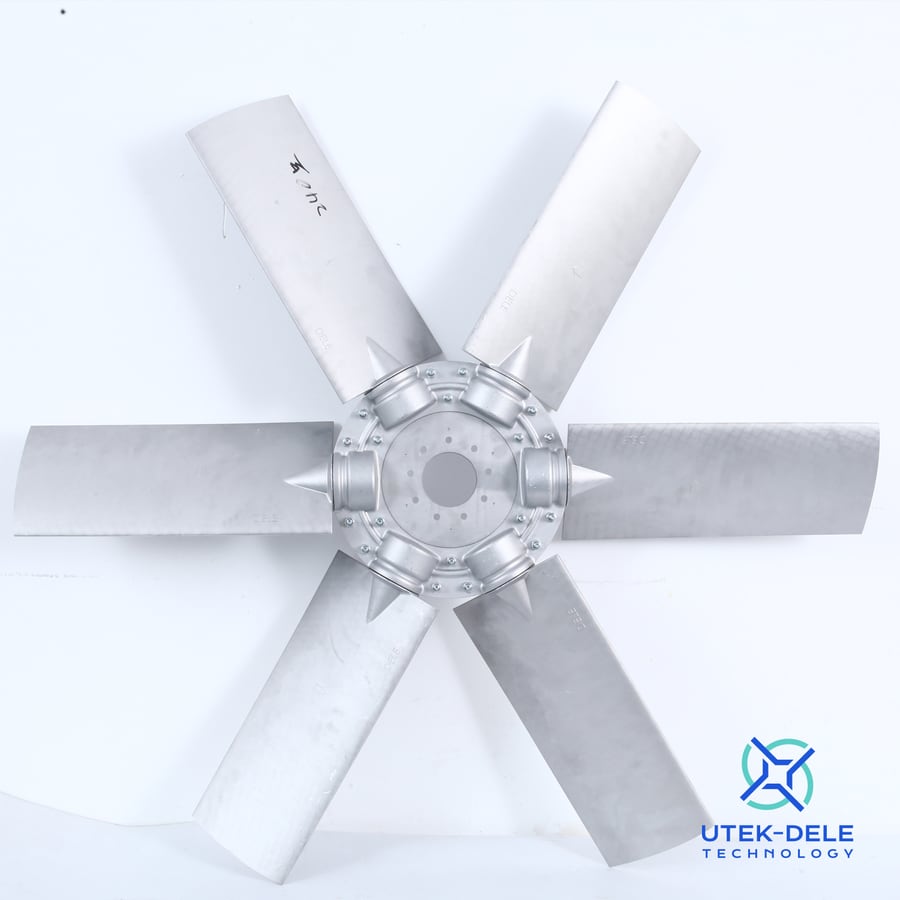
        UTEK-DELE 6W axial fan product assembly with central hub and blades
        UTEK-DELE 6W product reference. A product photo shows the form; confirm the exact received configuration from its identification evidence.

        Before quoting a new assembly, say which items remain. The machine-side shaft, coupling, adapter, shroud or guard may be retained while the hub and blades are changed together. If the enquiry is for individual blades, name the retained hub and provide the blade seating and retention detail for technical review. Keep that request explicit. A complete replacement reference does not authorise mixing an unidentified blade with another hub.

        Use the published blade and impeller cross-reference to check the established corresponding product references after the original reference has been identified. For example, the published mapping pairs Multi-Wing 7W with the UTEK-DELE 9W2 complete impeller. A separate enquiry for a unit known only as “seven blades” is still missing its original identity. Blade count and a model number are different observations.

        Separate what is known from what is inferred
        EvidenceSupported statementOpen question to keep visible
        Mark on a bladeThese characters appear on this componentWhich complete build and retained hub used it?
        Mark on a hubThis hub family or part code is visibleWhat is the exact machine connection and configuration?
        Old purchase recordThis assembly was ordered for the equipmentDoes the current installation match that record?
        Outer diameter and countThese geometric observations were recordedWhich profile, pitch, hub, material and duty apply?
        Similar photoThe form resembles a reference productWhich markings or dimensions confirm identification?

        3. Make the mounting and duty record useful

        Choose a machine-side reference face visible on the drawing or verifiable by approved inspection. Show where the old assembly seats and how far its swept envelope lies from that face. A dimension from the front of the old hub and one from the rear of a proposed hub cannot be compared until the two references are connected. Include bore, pilot, flange and retention information according to the actual connection, with the applicable tolerances from controlled documents.

        Show the opening around the fan at the relevant axial position. A taper, guard rim or radiator face can be the controlling restriction. Record any approved clearance or operating envelope requirement supplied by the equipment authority. A matching diameter addresses one dimension. Axial offset, centring and the rest of the occupied volume still need review. If an adapter is being retained, identify its drawing and include its seating reference in the comparison.

        Record the required airflow at its specified pressure basis, operating speed and relevant air condition where available. Ask the supplier and equipment owner which data or agreed checks are needed when these are missing. Keep the original information with its units. A free-air flow figure and a requirement through a restrictive cooling pack describe different conditions. The PMAX3 cooling-package comparison worksheet provides a sheet for aligning cooling-pack measurement references before judging two offers.

        An identification enquiry can proceed with an incomplete field when the question is labelled. For example, “mounting pilot not visible in approved service view; drawing requested” gives the supplier a precise issue. A guessed dimension entered as fact may result in a firm quote against the wrong requirement. Separate exact observations, document references and open questions in the record, then close the relevant gaps before order release.

        Replacement enquiry worksheet
        FieldObserved or documented valueSource and unresolved point
        Original referenceExact visible code and uncertaintyLabel, component marking or previous order
        Supply scopeComplete impeller or defined componentRetained items and requested supplier scope
        ConnectionDrive reference and seating detailControlled drawing or approved check
        EnvelopeDiameter and occupied axial spaceShroud section and required limits
        DirectionsRotation view and airflow directionAgreed drawing arrows
        DutyFlow, pressure basis, speed and conditionsEquipment data or required assessment
        ApprovalProposed configuration and revisionResponsible technical reviewer

        4. Review the identification before releasing a purchase

        Ask the supplier to return its proposed full assembly reference with a drawing and a list of assumptions. Compare the observed codes and the machine-side connection, then confirm the envelope and directions. If an original model has several configurations, retain the exact build reference and the selected material on the order. Have the responsible equipment personnel assess the required duty and installation evidence.

        If a proposed product differs from an initial guess, keep the evidence that changed the identification. A clearer hub marking, a recovered parts list or an interface dimension can resolve a misleading exterior photograph. Record the conclusion and the source so the next buyer can follow it. Once a matched configuration has been approved and installed, attach the acceptance record to the equipment ID rather than reopening the identification from a single old photo on the next order.

        The axial fan replacement guide organises blade and complete-assembly replacement scopes. Use it together with the completed worksheet and the supplier's offered drawing. A photo pack can start the conversation, a matched configuration makes the offer specific, and an approved installation record makes a repeat order straightforward.

        What if only one mark is readable?

        Record it with the component and viewing side. Add the equipment information and connection evidence. It can narrow a search, but the supplier should identify which remaining features are needed to confirm the whole assembly.

        Is the motor power enough to select the impeller?

        It is one input to the drive review. The required flow, pressure basis, speed, geometry and operating limits are also relevant. An impeller that mounts on the drive still needs a duty assessment for the actual equipment.

        Can I send photos without dimensions?

        Yes, for an initial identification discussion. Name the views and include the most legible marks and the whole installation. Ask which specific drawings or authorised measurements are needed before a configuration can be released.

        What should be saved after the first replacement?

        Save the approved full assembly reference, original identification evidence, accepted drawing, installation conditions and release record under the equipment ID. That makes the next enquiry about an identified build, with any equipment changes clearly shown.

        Axial Fan Identification Worksheet for Missing Labels

        • 1. Collect evidence from a named viewpoint

        • 2. Keep component identity separate from assembly identity

        • 3. Make the mounting and duty record useful

        • 4. Review the identification before releasing a purchase

        When a fan label is unreadable, start a replacement enquiry with the equipment identity, photographs from named views and the machine-side mounting information. Preserve any surviving codes exactly as found. Record what remains on the machine and what is to be replaced, then add the fan duty or the evidence needed to establish it. A clear evidence pack helps a supplier identify the assembly and request the particular missing data that matter.

        This worksheet supports an industrial axial fan blade or complete impeller enquiry, including an enquiry about a Multi-Wing assembly. UTEK-DELE supplies direct replacements for the corresponding mapped products. The original assembly and installed configuration still need to be identified so the ordered hub, blades and interface fit the actual equipment. Record uncertainties visibly while that identification is completed.

        1. Collect evidence from a named viewpoint

        Use the equipment's approved service procedure for safe access and inspection. Ask qualified personnel to obtain the required photos or measurements when guards, isolation or disassembly are involved. A normal exterior photo can provide layout context, while a drive-side drawing or service record may supply dimensions without opening the assembly. Record where each piece of evidence came from.

        Take a whole-assembly image to show the fan in relation to the shroud and drive. Add a label or marking image and an interface view when available. Name the side from which each photo was taken. “Clockwise” from the drive side reads oppositely from a view from the other side. Keep an airflow arrow separate from the rotation statement so an observer does not infer one from the other.

        Save the equipment model and serial or asset ID with each set. Several machines of the same make can have different cooling packs or a fan replaced during service. If the source is an earlier drawing, identify its revision and confirm that the retained equipment still matches. A motor label helps identify the drive. A moulded blade mark can identify a component. Neither automatically identifies the complete fan build.

        Evidence to collect before selecting a replacement
        RecordWhat to provideWhat it helps identify
        EquipmentModel, asset or serial number and installed locationWhich machine the enquiry concerns
        Whole assemblyInstalled view with drive and shroud visibleRelative position and supply scope
        Surviving marksClear image and exact transcriptionBlade, hub or original build reference
        ConnectionReleased drawing or authorised measurementMachine-side interface that must match
        DirectionRotation with a named view plus separate airflow arrowRequired handed configuration
        Operating dataSpeed, duty and available drive informationConfiguration and performance review

        2. Keep component identity separate from assembly identity

        A complete impeller combines a matched hub and blade configuration. A blade mould number may identify a profile, but several builds may use a related profile at different diameters, counts or pitches. A hub designation can help narrow a family without defining every shaft or flange connection. Keep each mark connected to the physical component on which it was found. If the code is partly legible, include the original photo and mark uncertain characters rather than choosing a likely number.

        The UTEK-DELE 6W product reference shows one complete assembly family and helps a buyer see the hub and blade relationship. The UTEK-DELE 5W product reference is a separate product reference, and Multi-Wing 7W to UTEK-DELE 9W2 guide explains the corresponding 9W2 replacement direction. These references are useful when comparing confirmed codes and drawings. Their photos cannot establish a hidden mounting dimension or identify an unknown unit from a similar outline.

        UTEK-DELE 6W axial fan product assembly with central hub and blades
        UTEK-DELE 6W product reference. A product photo shows the form; confirm the exact received configuration from its identification evidence.

        Before quoting a new assembly, say which items remain. The machine-side shaft, coupling, adapter, shroud or guard may be retained while the hub and blades are changed together. If the enquiry is for individual blades, name the retained hub and provide the blade seating and retention detail for technical review. Keep that request explicit. A complete replacement reference does not authorise mixing an unidentified blade with another hub.

        Use the published blade and impeller cross-reference to check the established corresponding product references after the original reference has been identified. For example, the published mapping pairs Multi-Wing 7W with the UTEK-DELE 9W2 complete impeller. A separate enquiry for a unit known only as “seven blades” is still missing its original identity. Blade count and a model number are different observations.

        Separate what is known from what is inferred
        EvidenceSupported statementOpen question to keep visible
        Mark on a bladeThese characters appear on this componentWhich complete build and retained hub used it?
        Mark on a hubThis hub family or part code is visibleWhat is the exact machine connection and configuration?
        Old purchase recordThis assembly was ordered for the equipmentDoes the current installation match that record?
        Outer diameter and countThese geometric observations were recordedWhich profile, pitch, hub, material and duty apply?
        Similar photoThe form resembles a reference productWhich markings or dimensions confirm identification?

        3. Make the mounting and duty record useful

        Choose a machine-side reference face visible on the drawing or verifiable by approved inspection. Show where the old assembly seats and how far its swept envelope lies from that face. A dimension from the front of the old hub and one from the rear of a proposed hub cannot be compared until the two references are connected. Include bore, pilot, flange and retention information according to the actual connection, with the applicable tolerances from controlled documents.

        Show the opening around the fan at the relevant axial position. A taper, guard rim or radiator face can be the controlling restriction. Record any approved clearance or operating envelope requirement supplied by the equipment authority. A matching diameter addresses one dimension. Axial offset, centring and the rest of the occupied volume still need review. If an adapter is being retained, identify its drawing and include its seating reference in the comparison.

        Record the required airflow at its specified pressure basis, operating speed and relevant air condition where available. Ask the supplier and equipment owner which data or agreed checks are needed when these are missing. Keep the original information with its units. A free-air flow figure and a requirement through a restrictive cooling pack describe different conditions. The PMAX3 cooling-package comparison worksheet provides a sheet for aligning cooling-pack measurement references before judging two offers.

        An identification enquiry can proceed with an incomplete field when the question is labelled. For example, “mounting pilot not visible in approved service view; drawing requested” gives the supplier a precise issue. A guessed dimension entered as fact may result in a firm quote against the wrong requirement. Separate exact observations, document references and open questions in the record, then close the relevant gaps before order release.

        Replacement enquiry worksheet
        FieldObserved or documented valueSource and unresolved point
        Original referenceExact visible code and uncertaintyLabel, component marking or previous order
        Supply scopeComplete impeller or defined componentRetained items and requested supplier scope
        ConnectionDrive reference and seating detailControlled drawing or approved check
        EnvelopeDiameter and occupied axial spaceShroud section and required limits
        DirectionsRotation view and airflow directionAgreed drawing arrows
        DutyFlow, pressure basis, speed and conditionsEquipment data or required assessment
        ApprovalProposed configuration and revisionResponsible technical reviewer

        4. Review the identification before releasing a purchase

        Ask the supplier to return its proposed full assembly reference with a drawing and a list of assumptions. Compare the observed codes and the machine-side connection, then confirm the envelope and directions. If an original model has several configurations, retain the exact build reference and the selected material on the order. Have the responsible equipment personnel assess the required duty and installation evidence.

        If a proposed product differs from an initial guess, keep the evidence that changed the identification. A clearer hub marking, a recovered parts list or an interface dimension can resolve a misleading exterior photograph. Record the conclusion and the source so the next buyer can follow it. Once a matched configuration has been approved and installed, attach the acceptance record to the equipment ID rather than reopening the identification from a single old photo on the next order.

        The axial fan replacement guide organises blade and complete-assembly replacement scopes. Use it together with the completed worksheet and the supplier's offered drawing. A photo pack can start the conversation, a matched configuration makes the offer specific, and an approved installation record makes a repeat order straightforward.

        What if only one mark is readable?

        Record it with the component and viewing side. Add the equipment information and connection evidence. It can narrow a search, but the supplier should identify which remaining features are needed to confirm the whole assembly.

        Is the motor power enough to select the impeller?

        It is one input to the drive review. The required flow, pressure basis, speed, geometry and operating limits are also relevant. An impeller that mounts on the drive still needs a duty assessment for the actual equipment.

        Can I send photos without dimensions?

        Yes, for an initial identification discussion. Name the views and include the most legible marks and the whole installation. Ask which specific drawings or authorised measurements are needed before a configuration can be released.

        What should be saved after the first replacement?

        Save the approved full assembly reference, original identification evidence, accepted drawing, installation conditions and release record under the equipment ID. That makes the next enquiry about an identified build, with any equipment changes clearly shown.

        Recommended Products

        6W High-Efficiency Large-Diameter Axial Fan Impeller for Engine Cooling
        W Series

        6W High-Efficiency Large-Diameter Axial Fan Impeller for Engine Cooling

        Model6W
        5W Large Tube Axial Fan Impeller for Industrial Cooling
        W Series

        5W Large Tube Axial Fan Impeller for Industrial Cooling

        Model5W

        News and Articles

        img of Multi-Wing 7W Replacement: How to Specify a Complete UTEK-DELE 9W2 Impeller

        Multi-Wing 7W Replacement: How to Specify a Complete UTEK-DELE 9W2 Impeller

        Replace the corresponding Multi-Wing 7W with a configured UTEK-DELE 9W2 complete axial impeller. Use this guide to specify fit, operating duty and an order-ready quotation.
        View More
        • Quick LinksProductsApplicationsNews
        • Main ProductsReversible FanSmall FanMedium FanBig FanAir Cooling SystemsEquipment
        • ApplicationsHVACEngine CoolingOther
        • Contact Us

          13775063485

          0086-13775063485

          admin@utekdele.com

          No.120, TaihuEast Road, Sanjing Street, Xinbei District, Changzhou, Jiangsu, China

        CopyRight © 2026 - UTEK-DELE Technology Changzhou Co., Ltd  All rights reserved  Sitemap   All tags   Designed by Zhonghuan Internet
        Contact
        0086-13775063485
        admin@utekdele.com
        13775063485
        To Top

        • Tel

        • E-mail

        • Contact